
TOP 10 Best Tv Sticks 2026
In an era of endless streaming content, TV sticks have become indispensable gadgets, transforming any regular TV into a smart entertainment hub. These compact, plug-and-play devices offer a cost-effective alternative to buying a new smart TV, providing access to a vast universe of apps, movies, shows, and games. With fierce competition among major players like Amazon, Google, and Roku, choosing the right TV stick can be a nuanced decision.




This buying guide will walk you through the key ecosystems, features, and specifications, ensuring you pick the perfect streaming companion for your living room.
The “best” TV stick isn’t universal; it’s the one that best fits your existing ecosystem, TV capabilities, and viewing habits.
Ecosystem and User Interface
The underlying operating system dictates the look, feel, and app availability.
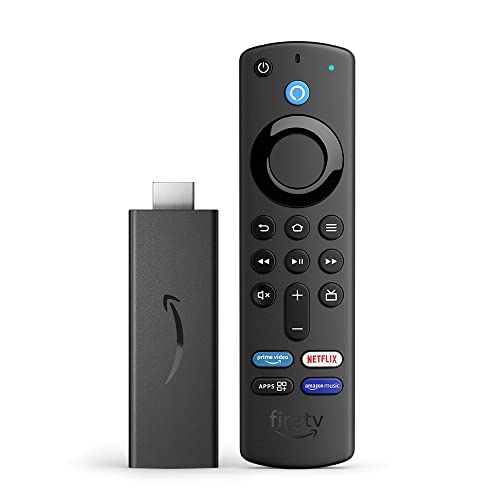
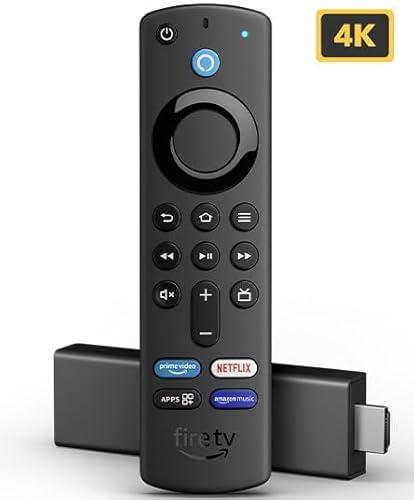
Amazon Fire TV Stick (Fire OS):
- Pros: Heavily integrated with Amazon’s services (Prime Video, Alexa voice assistant). Offers a vast app library. Often has strong performance even on mid-range models. Features like “Live TV” tab can integrate various streaming services.
- Cons: The interface can feel a bit cluttered with Amazon content/ads. Less intuitive for users not deeply invested in the Amazon ecosystem.
- Models: Fire TV Stick HD (for 1080p TVs), Fire TV Stick 4K, Fire TV Stick 4K Max (2nd Gen – best overall performance, Wi-Fi 6E).
Chromecast with Google TV (Google TV OS):
- Pros: Excellent content discovery and recommendations, integrating content from all your subscribed services into one unified interface. Strong Google Assistant integration. Supports casting directly from phones/tablets.
- Cons: Can be pricier than some Fire TV/Roku entry-level options. Limited internal storage (often 8GB, with less usable). Historically, some models only supported Wi-Fi 5.
- Models: Chromecast with Google TV 4K (and newer “Google TV Streamer” which may have better specs).
Roku Streaming Stick (Roku OS):
- Pros: Simplest and most user-friendly interface, great for beginners. Platform-agnostic approach with a massive channel (app) store. Strong focus on free content options.
- Cons: Less emphasis on integrated voice assistants compared to Alexa or Google Assistant. Less powerful hardware in some entry-level models.
- Models: Roku Streaming Stick 4K, Roku Streaming Stick 4K+ (often includes a rechargeable voice remote).
Resolution and HDR Support
Future-proofing your purchase involves matching the stick’s capabilities to your TV.
Full HD (1080p): If you have an older Full HD TV, a basic 1080p stick (like the Fire TV Stick HD or Roku Express HD) is sufficient and more affordable.
4K Ultra HD (2160p): If you have a 4K TV, a 4K-compatible stick is essential to take advantage of your TV’s resolution.
HDR (High Dynamic Range): For vibrant colors and improved contrast, ensure the stick supports HDR formats. Look for:
HDR10: The universal standard.
HDR10+: An advanced HDR format with dynamic metadata (supported by Amazon Prime Video, some Samsung TVs).
Dolby Vision: Another advanced HDR format with dynamic metadata, often found on Netflix, Disney+, and many LG/Sony/TCL TVs.
Recommendation: For 4K TVs, aim for a stick that supports 4K resolution, HDR10, HDR10+, and Dolby Vision for the broadest compatibility with premium content.
Performance: Processor, RAM, and Wi-Fi
These internal specs dictate the smoothness of the interface and loading times.
Processor & RAM: More powerful processors and higher RAM (e.g., 2GB RAM common in 4K sticks, some Max/Ultra models might have more) lead to faster app loading, smoother navigation, and less buffering.
Wi-Fi Standards:
- Wi-Fi 5 (802.11ac): Common and generally sufficient for stable 4K streaming if your router is close and your network isn’t too congested.
- Wi-Fi 6 (802.11ax): Found in newer, slightly more expensive models (e.g., Fire TV Stick 4K Max). Offers better performance in congested network environments and is more efficient, especially if you have a Wi-Fi 6 router.
- Wi-Fi 6E (802.11ax on 6GHz band): Featured in top-tier sticks (e.g., Fire TV Stick 4K Max 2nd Gen). Provides access to the less congested 6GHz band for potentially even faster and more stable performance, but requires a compatible Wi-Fi 6E router.
- Storage: Most sticks come with 8GB or 16GB of internal storage. While not for massive downloads, more storage is better for installing numerous apps without constantly managing space.
- Recommendation: For the best experience, especially if you have a modern router, prioritize a stick with a newer processor and Wi-Fi 6 or 6E.
Remote Control and Voice Assistant
The remote is your primary interaction tool, and voice assistants simplify navigation.
- Voice Control: All major TV sticks come with voice remotes.
- Alexa: For Fire TV Sticks (excellent for Amazon integration, smart home control).
- Google Assistant: For Chromecast with Google TV (great for content search, smart home control, and Google ecosystem users).
- Roku Voice Remote: Simpler voice search for content within Roku’s app ecosystem.
- Dedicated App Buttons: Many remotes include dedicated buttons for popular streaming services (Netflix, Prime Video, Disney+, etc.) for quick access.
- TV Controls: Look for remotes that can also control your TV’s power and volume via IR (infrared blaster), reducing remote clutter.
- Private Listening (Roku Ultra): Higher-end Roku models often feature a headphone jack on the remote for private listening.
Additional Features
Casting/Mirroring: All major platforms allow casting from your phone, but Chromecast (Google TV) is generally the most robust for this.
Gaming: While not dedicated gaming consoles, some sticks (especially Fire TV 4K Max with Xbox Cloud Gaming support or Android TV sticks) can connect to Bluetooth controllers for casual cloud gaming.
Ethernet Port: Some high-end streaming boxes (like Fire TV Cube or Nvidia Shield TV) or specific dongles for stick models (e.g., for Chromecast) offer an Ethernet port for the most stable wired connection.
Conclusion
Choosing the right TV stick involves matching its ecosystem and features to your personal preferences and home setup. If you’re an Amazon Prime user and prefer Alexa, a Fire TV Stick 4K Max offers excellent performance and features. If you live in the Google ecosystem and want smart content recommendations, Chromecast with Google TV is a strong contender. For unparalleled simplicity and a vast app library, a Roku Streaming Stick 4K is hard to beat. By focusing on the desired resolution, HDR support, performance, and remote features, you can confidently select a TV stick that unlocks a world of entertainment on your television.